


When it comes to upgrading your home lighting with smart technology, the GE smart bulb has become one of the most recognizable and trusted names on the market. Whether you are just starting your smart home journey or looking to expand an existing setup, GE offers a range of smart bulbs that deliver reliability, energy efficiency, and seamless integration with popular voice assistants and smart home ecosystems. This comprehensive guide covers everything you need to know about GE smart bulbs, from product types and setup to real-world performance tips that even seasoned smart home users will appreciate.
What Is a GE Smart Bulb and Why Does It Matter?
A GE smart bulb is an LED light bulb equipped with built-in wireless connectivity, allowing you to control it remotely using a smartphone app, voice commands, or automated routines. Unlike traditional incandescent bulbs or even standard LED bulbs, GE smart bulbs connect to your home WiFi network and work with platforms like Amazon Alexa, Google Assistant, and Apple HomeKit (depending on the model). This means you can dim your lights, change colors, set schedules, and create scenes — all without touching a physical switch.
The significance of choosing a GE smart bulb over generic alternatives comes down to a combination of brand trust, consistent firmware updates, and a user-friendly app experience. GE has been in the lighting industry for over a century, and that legacy translates into quality manufacturing, consistent performance, and strong compatibility with third-party smart home platforms.
Types of GE Smart Bulbs Available
GE has designed its smart bulb lineup to serve different lighting needs, budgets, and smart home ecosystems. Here is a breakdown of the most popular categories:
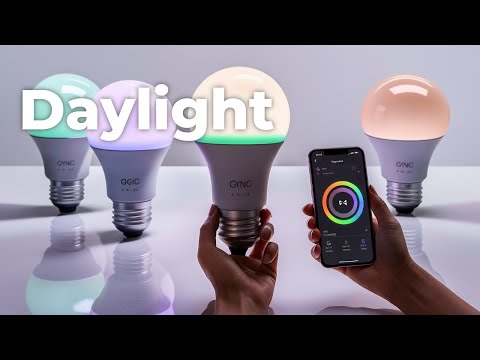
- GE WiFi Smart Bulbs (Cync Series): These bulbs connect directly to your home WiFi without needing a separate hub or bridge. They support color changing, dimming, and scheduling through the GE Cync app and work with Alexa and Google Assistant natively.
- GE Cync Color LED Smart Bulbs: Offering a full 16 million color palette, these bulbs are ideal for accent lighting, entertainment setups, and mood lighting. They integrate seamlessly with Alexa and Google Home routines.
- GE Cync Tunable White Smart Bulbs: Instead of colors, these bulbs let you shift the white light from warm amber (2700K) to cool daylight (5000K), making them perfect for bedrooms, offices, and living rooms where task lighting matters.
- GE Enbrighten Smart Bulbs: These bulbs target users who want a balance of smart features and classic aesthetics. They offer dimming and scheduling with a focus on easy setup and broad compatibility.
Key Features That Set GE Smart Bulbs Apart
When evaluating smart bulbs, the features matter more than just the brand name. Here is what you get with most GE smart bulb models:
- Direct WiFi Connectivity: No hub required for WiFi models. You screw in the bulb, download the app, and you are ready to go within minutes.
- Voice Assistant Compatibility: Works with Amazon Alexa, Google Assistant, and in some cases Samsung SmartThings. This means hands-free control from virtually anywhere in your home.
- Scheduling and Automation: Set sunrise and sunset routines, turn lights on when you arrive home, or create custom scenes for movie nights, reading, or parties.
- Energy Efficiency: GE smart bulbs use LED technology that consumes up to 80% less energy than traditional incandescent bulbs, which translates to significant savings on your electricity bill over time.
- Dimming Support: Most models are dimmable and offer granular control over brightness levels through the app or voice commands.
- Group Control: Control multiple bulbs simultaneously by grouping them in the app, which is especially useful for whole-room or whole-home lighting setups.
How to Set Up a GE Smart Bulb
Setting up a GE smart bulb is straightforward, even for beginners. Follow these steps for a smooth installation:
Step-by-Step Setup Process
- Screw the GE smart bulb into a standard light socket that is powered on.
- Download the GE Cync app (or the relevant app for your bulb model) from the App Store or Google Play.
- Create an account or sign in with your existing credentials.
- Follow the on-screen prompts to connect the bulb to your home WiFi network.
- Once connected, assign the bulb a name and room location within the app.
- Link the app to your preferred voice assistant (Alexa, Google Assistant) for hands-free control.

Expert Tip: If your bulb does not appear during setup, try resetting it by toggling the light switch on and off rapidly three to five times. This forces the bulb into pairing mode, which resolves most connection issues.
GE Smart Bulb Comparison Table
| Model | Connectivity | Color Options | Hub Required | Voice Assistants |
| GE WiFi Smart Bulb | WiFi Direct | Tunable White | No | Alexa, Google |
| GE Cync Color Bulb | WiFi Direct | 16 Million Colors | No | Alexa, Google |
| GE Cync Tunable White | WiFi Direct | Warm to Cool White | No | Alexa, Google |
| GE Enbrighten Smart | WiFi Direct | Tunable White | No | Alexa, Google |
Common Issues and Troubleshooting
Even the best smart bulbs can occasionally cause frustration. Here are the most common problems users encounter with GE smart bulbs and how to resolve them:
- Bulb Not Responding in the App: Check that the bulb is powered on and within WiFi range. A weak signal is the most frequent cause. Consider moving your router closer or using a WiFi extender.
- Voice Commands Not Working: Ensure the bulb is properly linked to your voice assistant app. Sometimes unlinking and relinking the skill or action fixes the disconnect.
- Slow Response Times: Direct WiFi bulbs can experience slight delays if your network is congested. Upgrading to a mesh WiFi system can significantly improve responsiveness.
- Flickering After Power Outages: This is normal behavior for many smart bulbs. Simply toggle the switch off and back on to restore normal operation.
Expert Tips for Maximizing Your GE Smart Bulb Experience
Once your GE smart bulbs are up and running, these practical strategies will help you unlock their full potential:

- Create Lighting Scenes: Instead of controlling each bulb individually, set up named scenes like “Morning Boost,” “Movie Time,” or “Relaxing Evening” for one-tap activation.
- Use Schedules Wisely: Program bulbs to turn on and off at specific times to simulate occupancy when you are away, which adds a layer of home security.
- Leverage Geofencing: If your smart home app supports location-based automation, set your lights to turn on automatically when you arrive home and off when you leave.
- Mix Bulb Types Strategically: Use tunable white bulbs in workspaces for better focus and color bulbs in living areas for ambient atmosphere. This approach balances functionality and aesthetics.
- Keep Firmware Updated: Check the GE Cync app periodically for firmware updates that improve performance, fix bugs, and add new features.
Who Should Choose GE Smart Bulbs?
GE smart bulbs are an excellent choice for a wide range of users. If you are a beginner exploring smart home lighting for the first time, the direct WiFi connectivity means there is no extra hardware to buy or configure — just screw in the bulb and start controlling it. For intermediate users, the scheduling, scene creation, and automation features provide enough depth to build a genuinely customized lighting environment. Even advanced users who manage multi-room setups or complex routines will appreciate the reliability and broad compatibility that GE brings to the table.
Compared to competitors like Philips Hue, which requires a Hue Bridge for most features, GE smart bulbs offer a more accessible entry point at a lower price point. While Philips Hue has a broader ecosystem and more polished third-party integrations, GE bulbs deliver outstanding value for users who want direct WiFi control without the added cost of a hub.
Final Thoughts
The GE smart bulb represents a smart, practical investment for anyone looking to modernize their home lighting. With direct WiFi connectivity, voice assistant support, energy-efficient LED technology, and a lineup that covers everything from tunable white to full-color options, GE has built a product range that genuinely serves the majority of smart home users without overcomplicating things. Whether you are replacing a single bulb in a bedside lamp or outfitting an entire home with connected lighting, GE smart bulbs deliver a reliable and intuitive experience that justifies the upgrade.
Frequently Asked Questions
Can I use a GE smart bulb with a standard dimmer switch? Most GE smart bulbs are designed to work in standard sockets and should not be used with traditional dimmer switches, as this can cause flickering or damage. Instead, use the app or voice commands to control brightness digitally.
Do GE smart bulbs work without an internet connection? Local control through the app may still work if your phone is on the same WiFi network, but remote access and voice assistant features will not function without an active internet connection.
What is the lifespan of a GE smart bulb? GE smart bulbs typically last around 15,000 to 25,000 hours, depending on the model. At average daily usage of three hours, that translates to roughly 10 to 25 years of reliable service.
Are GE smart bulbs compatible with Apple HomeKit? Compatibility varies by model. Some GE Cync bulbs support Apple HomeKit, while others are limited to Alexa and Google Assistant. Always check the product specifications before purchasing if HomeKit compatibility is essential.
Can I control multiple GE smart bulbs at once? Yes, the GE Cync app allows you to group multiple bulbs together and control them simultaneously. You can also create room-based groupings for organized, whole-space control.
What happens if the bulb loses power and turns off accidentally? GE smart bulbs will reconnect to your WiFi network automatically once power is restored. If the bulb does not reconnect, toggling the light switch off and on should force it to rejoin the network.