



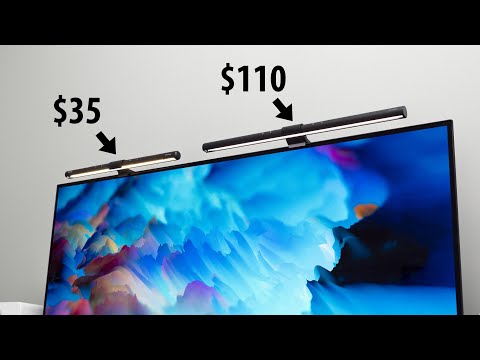
If you spend hours working or gaming at a computer, the lighting above your desk is one of the most overlooked yet critical elements of your setup. A computer desk light does more than just illuminate your workspace—it reduces eye strain, boosts productivity, and even enhances the aesthetic appeal of your entire desk environment. Whether you are a remote professional, a student pulling late-night study sessions, or a dedicated gamer, choosing the right desk lamp can make a noticeable difference in comfort and performance. In this comprehensive guide, we will explore everything you need to know about selecting, positioning, and getting the most out of your computer desk lighting setup.
Why a Computer Desk Light Matters More Than You Think
Most people underestimate the impact of poor lighting on their daily routine. When your desk is either too dim or too harshly lit, your eyes work overtime to compensate. This leads to digital eye strain, headaches, fatigue, and even disrupted sleep patterns—especially if you work late into the evening under blue-rich light. A well-chosen desk lamp for computer work provides focused, balanced illumination that reduces glare on your monitor and lights up your keyboard, documents, or workspace evenly.
Beyond ergonomics, there is a strong productivity angle. Studies consistently show that proper task lighting improves concentration and reduces the likelihood of errors during detail-oriented work like coding, graphic design, or data entry. A computer workspace lamp also helps establish a visual boundary between your work area and the rest of your room, which psychologically signals focus and readiness.
Types of Computer Desk Lights Available in 2024
LED Desk Lamps
LED desk lamps are the gold standard for computer desk lighting. They are energy-efficient, produce minimal heat, and offer a lifespan that often exceeds 50,000 hours. Modern LED desk lamps come with adjustable color temperatures ranging from warm 2700K to cool 6500K, allowing you to match the light to your task and time of day. For computer use, a color temperature between 4000K and 5000K is generally recommended because it mimics natural daylight without the harshness of pure white light.
RGB Gaming Desk Lights
If you are building a gaming desk or want to add personality to your setup, RGB desk lights are an increasingly popular choice. These strip-style lights mount to the back of your monitor or desk edge and provide ambient color cycling, reactive lighting effects, and customizable scenes. While they are less functional as task lighting, they significantly reduce the contrast between your bright monitor and a dark room—which is one of the biggest causes of eye fatigue during gaming sessions.
Adjustable Arm and Clamp Desk Lamps
Adjustable arm desk lamps offer the most flexibility in positioning. A clamp-mounted version attaches directly to your desk edge or monitor stand, freeing up valuable desk space. The gooseneck or spring-arm designs let you direct light exactly where you need it—whether that is your keyboard, a stack of papers, or a specific corner of your desk. These are ideal for users who need task lighting for office desk setups that shift throughout the day.
Key Features to Look for in a Computer Desk Light
Not all desk lamps are created equal. When shopping for the best computer desk light, pay close attention to the following features:

- Color Temperature Range: Look for lamps that offer at least 3000K to 6000K so you can switch between warm and cool light depending on your activity and time of day.
- Brightness Levels (Lumens): A range between 400 and 1200 lumens is typically sufficient for most desk setups. Too bright, and you create glare; too dim, and you strain your eyes.
- Glare and Flicker-Free Design: Cheap LED lamps often flicker at imperceptible rates, which causes subtle but cumulative eye fatigue. Always choose flicker-free desk lamps with diffused light covers.
- Adjustability: Height adjustment, swivel heads, and flexible arms let you fine-tune the light angle and reach.
- USB Charging Port: Many modern computer desk lights include a built-in USB-A or USB-C port, which lets you charge your phone or tablet directly from the lamp base—saving a power outlet.
- Smart Controls: Touch-sensitive panels, remote controls, and app-based adjustments are becoming standard even in mid-range models.
- Build Quality and Cable Management: A sturdy base prevents tipping, and integrated cable routing keeps your desk neat.
Comparison: Top Computer Desk Light Categories
| Type | Best For | Pros | Cons |
| LED Desk Lamp | Office work, reading, general productivity | Energy efficient, long lifespan, adjustable color temp | Can be pricey for premium models |
| RGB Gaming Light | Gaming setups, ambient decoration | Customizable colors, reduces monitor contrast, immersive | Poor as primary task lighting |
| Clamp Arm Lamp | Small desks, limited workspace | Saves space, highly adjustable, versatile positioning | May not look as sleek as traditional lamps |
| Smart Desk Light | Tech enthusiasts, automation lovers | App control, schedules, voice integration | Requires Wi-Fi or Bluetooth setup |
Expert Tips for Positioning Your Computer Desk Light
Even the most expensive desk lamp for computer screen will underperform if it is poorly positioned. Here are expert-recommended placement strategies:
- Place the lamp opposite your dominant hand. If you are right-handed, position the light on your left side so that your hand does not cast shadows across your work surface while writing or typing.
- Angle the light toward your desk surface, not your eyes. Direct light into your monitor creates glare and reflections that force your pupils to constantly adjust, leading to faster fatigue.
- Keep the light source at or slightly above eye level. This provides even coverage across your desk without creating harsh shadows on your face.
- Use indirect or diffused lighting for late-night sessions. Switch to warmer color temperatures (2700K–3000K) in the evening to minimize blue light exposure, which can suppress melatonin production and disrupt your sleep cycle.
- Combine ambient and task lighting. A single bright desk lamp is not always enough. Pair your task light with a soft ambient light source—like an LED strip behind your monitor—to reduce the contrast ratio between your screen and the surrounding room.
How to Choose the Right Computer Desk Light for Your Setup
Selecting the ideal computer desk light depends on several personal factors. First, consider the size of your desk. A small study desk benefits from a compact clamp lamp, while a large executive desk can accommodate a full-sized LED lamp with a wide light spread. Second, think about your primary activities. If you are mostly coding or writing, prioritize a clean, neutral light with minimal color rendering issues. If you are a designer or video editor, look for lamps with a high Color Rendering Index (CRI) of 90 or above so that colors appear accurate under the light.
Budget also plays a role. You can find excellent basic LED desk lamps in the $20 to $40 range that cover 90% of users’ needs. Premium models with smart features, premium build quality, and advanced dimming typically range from $60 to $150. For gaming setups, RGB strip lights start as low as $10 and scale up to $50 for feature-rich kits with music-reactive modes and sync capabilities.

Pro tip: When possible, purchase a lamp with a return policy. Because lighting preference is highly subjective, what looks perfect in a product photo may feel wrong in your actual room. Test the color temperature and brightness in your real environment before committing long-term.
Conclusion
A computer desk light is far more than a decorative accessory—it is a tool that directly impacts your eye health, productivity, and overall comfort during long hours at your desk. From selecting the right type and features to positioning it correctly and managing color temperatures throughout the day, every detail matters. Whether you invest in a sleek LED desk lamp for professional work or add an RGB strip for your gaming rig, the goal remains the same: a well-lit, comfortable workspace that lets you focus on what matters most.
Take the time to evaluate your current setup. If your desk is lit by a single overhead ceiling fixture or nothing at all, upgrading to a dedicated computer desk lamp could be one of the simplest and most rewarding changes you make to your workspace this year.
Frequently Asked Questions
What is the best color temperature for a computer desk light?
For most computer work, a color temperature between 4000K and 5000K is ideal. This range provides a neutral, daylight-like illumination that reduces eye strain and keeps you alert. In the evening, switching to a warmer 2700K–3000K helps minimize blue light exposure and supports healthy sleep patterns.
How bright should a computer desk lamp be in lumens?
A desk lamp with 400 to 1200 lumens is generally sufficient for most computer desk setups. If you work with detailed design work or read physical documents frequently, aim for the higher end of that range. For general computing tasks, 500–800 lumens strikes a comfortable balance between visibility and comfort.
Can a desk lamp cause eye strain if it is not positioned correctly?
Yes, absolutely. A desk lamp positioned too close, angled directly into your eyes, or creating harsh shadows can cause significant eye strain and headaches. The key is to direct the light onto your work surface at an angle that avoids glare on your computer monitor and minimizes contrast between the lit area and the rest of your room.
Are USB-powered computer desk lights worth it?
USB-powered desk lights are extremely convenient because they draw power from your monitor, laptop, or USB hub, eliminating the need for a wall outlet. They are especially useful for compact desks or shared workspaces where outlets are scarce. However, they sometimes offer slightly lower brightness compared to plug-in models, so check the lumen output before purchasing.
What is the difference between a CRI rating and why does it matter for desk lights?
CRI, or Color Rendering Index, measures how accurately a light source reproduces colors compared to natural sunlight. A CRI of 100 is perfect. For computer desk use, a lamp with a CRI of 90 or above ensures that on-screen colors, printed materials, and physical objects appear true to life. This is especially important for designers, photographers, and anyone working with color-critical tasks.