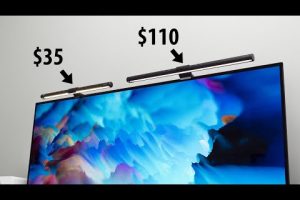



If you spend hours working at a desk, you already know that proper lighting can make or break your productivity, comfort, and even your long-term eye health. A computer table lamp is far more than a decorative accessory sitting on your desk—it is a purpose-built lighting solution engineered to reduce eye strain, minimize screen glare, and create an optimal work environment. Whether you are a remote professional, a college student pulling late-night study sessions, or a creative designer who demands precise color accuracy, the right desk lamp can transform your entire workspace. In this comprehensive guide, we will walk you through everything you need to know about choosing, using, and getting the most out of a computer table lamp, from fundamental buying criteria to advanced features that separate budget models from premium options.
What Is a Computer Table Lamp and Why It Matters
A computer table lamp is a specialized desk lamp designed to provide focused, comfortable illumination for tasks performed in front of a screen or workstation. Unlike traditional floor lamps or overhead ceiling lights, these lamps are engineered to sit directly on your desk, casting light exactly where you need it without flooding your monitor with unwanted glare. The importance of task lighting in a workspace cannot be overstated. Poor illumination forces your eyes to constantly adjust between the brightness of your screen and the dimness of your surroundings, leading to headaches, fatigue, and blurred vision over time.
The Science Behind Workspace Lighting
Research in occupational ergonomics consistently shows that ambient lighting levels should match the luminance of your computer screen. A standard office task requires roughly 300 to 500 lux at the desk surface. Computer table lamps equipped with adjustable brightness allow you to hit this sweet spot precisely. When your workspace is properly lit, your pupils remain at a consistent diameter, your blink rate stays normal, and the risk of developing digital eye strain drops significantly. This is why investing in a quality LED desk lamp for computer use is one of the smartest ergonomic upgrades you can make.
Key Features to Look for When Buying a Computer Table Lamp
Not all desk lamps are created equal. The market is saturated with options ranging from ultra-affordable clip-on lights to premium architect-grade task lamps. To make an informed decision, you need to understand the core features that truly matter for computer work.
Brightness and Dimming Options
The ability to control brightness is non-negotiable. Look for lamps that offer a wide dimming range, ideally from 10% to 100% output. Touch-sensitive sliders, rotary dials, and even app-controlled dimming are increasingly common. A lamp with only fixed brightness settings will leave you squinting during late-night work sessions or bathing your desk in harsh light during daytime hours.
Color Temperature Control

Modern computer table lamps often feature adjustable color temperature, measured in Kelvin (K). Cool light around 5000K to 6500K mimics daylight and promotes alertness—ideal for morning work sessions. Warm light at 2700K to 3000K relaxes the eyes and is better suited for evening use. Lamps with a tunable white LED system let you shift between these ranges seamlessly, supporting your natural circadian rhythm throughout the day.

Light Distribution and Glare Control
A well-designed computer desk lamp should distribute light evenly across your working surface without creating harsh hotspots or sharp shadows. Features like frosted LED covers, asymmetric beam patterns, and adjustable lamp arms help achieve uniform illumination. Pay special attention to whether the lamp produces direct glare on your monitor, as this is one of the most common complaints among desk workers.

Build Quality and Adjustability
The best computer table lamps feature robust bases that prevent tipping, flexible gooseneck or articulated arms, and smooth joint mechanisms that hold their position. Materials matter too—aluminum alloy and steel constructions tend to last longer than plastic alternatives, especially if you plan to move your lamp frequently.
Types of Computer Table Lamps Available Today
Understanding the different categories of desk lamps helps you narrow your search quickly. Here are the most popular types you will encounter:
- Traditional Gooseneck Lamps — These are the classic desk lamps with a flexible, curved neck that bends into any position. They offer excellent directional control and are perfect for focused task lighting.
- Clamp-On Desk Lamps — These mount directly to the edge of your desk, saving valuable workspace. They are ideal for small desks or shared workstations where space is at a premium.
- Arc Desk Lamps — With a curved arm that rises from the base and bends over the desk, arc lamps provide broad coverage and a modern aesthetic. They work well in larger home office setups.
- USB-Powered and Portable Lamps — Lightweight and rechargeable, these lamps are perfect for laptop users, travelers, and anyone who needs flexible lighting on the go.
- Smart Desk Lamps — Equipped with Bluetooth connectivity, app controls, voice assistant integration, and even built-in wireless charging pads, these lamps represent the cutting edge of workspace lighting technology.
Top Benefits of Using a Dedicated Computer Table Lamp
Switching to a purpose-built computer desk lamp delivers tangible benefits that go beyond aesthetics:
- Reduced Eye Strain and Fatigue — Consistent, well-directed light keeps your eyes comfortable during extended screen time, reducing the symptoms of computer vision syndrome.
- Improved Focus and Productivity — Proper illumination enhances contrast on your desk documents and keyboard, helping you work faster and with fewer errors.
- Better Sleep Quality — Adjustable warm light settings allow you to reduce blue light exposure in the evening, supporting healthier sleep patterns.
- Energy Efficiency — LED computer lamps consume a fraction of the power used by traditional incandescent bulbs, often lasting 25,000 to 50,000 hours.
- Enhanced Workspace Aesthetics — A well-chosen lamp adds a polished, professional look to your desk, contributing to a more inspiring work atmosphere.
Comparison: Popular Computer Table Lamps at Different Price Points
| Lamp Model | Type | Brightness (Lux) | Color Temp Range | Price Range |
| BenQ ScreenBar Halo | Monitor-mounted | Up to 800 | 2700K–6500K | $180–$220 |
| TaoTronics TT-DL16 | Gooseneck | Up to 1200 | 3000K–6500K | $30–$45 |
| BenQ e-Reading LED | Traditional desk | Up to 1000 | 2700K–5700K | $100–$140 |
| Anker Lumos A5 | Arc desk | Up to 900 | 3000K–6000K | $60–$80 |
| Xiaomi Mi Desk Lamp 1S | Minimalist desk | Up to 600 | 2700K–6500K | $20–$35 |
Each of these options serves a different need. The BenQ ScreenBar Halo is a top choice for monitor users who want zero desk clutter, while the TaoTronics TT-DL16 delivers exceptional value for budget-conscious buyers. The BenQ e-Reading LED sits in the sweet spot for those who want professional-grade build quality without breaking the bank.
Expert Tips for Choosing and Using Your Computer Table Lamp
Here are some practical recommendations drawn from professional ergonomics and lighting design principles:
- Position your lamp to the side of your monitor, not directly behind or in front of it, to eliminate screen reflections and shadows on your keyboard.
- Start with a warm color temperature (around 3000K) and gradually increase during the day if you need more alertness.
- Choose a lamp with a flicker-free LED driver. Flickering lights may not be visible to the naked eye but can cause subconscious eye fatigue and headaches over hours of exposure.
- Consider your desk size when selecting lamp length and arm reach. A small lamp on a large desk will leave dark zones; an oversized lamp on a tiny desk creates clutter.
- Look for lamps with a high color rendering index (CRI) of 90 or above. A high CRI ensures that colors on your documents, design work, and printed materials appear accurate and natural under the lamp’s light.
- Test the dimming smoothness before purchasing if possible. Jerky or stepped dimming can be distracting and indicates a lower-quality LED driver circuit.
Frequently Asked Questions About Computer Table Lamps
What is the best color temperature for a computer table lamp during work hours?
Most lighting experts recommend a color temperature between 4000K and 5000K for daytime computer work. This neutral-to-cool white light closely mimics natural daylight, promotes alertness, and reduces eye fatigue. However, if you are sensitive to cool light or work late into the evening, shifting toward 3500K or warmer during afternoon hours can help protect your sleep cycle.
Can a computer table lamp replace overhead room lighting?
A computer desk lamp is designed for task lighting, not to completely replace ambient overhead lighting. Ideally, you should use both—overhead lights for general room illumination and your computer table lamp for focused desk work. Relying solely on a desk lamp can create harsh contrast between the brightly lit desk and the darker surrounding room, which actually increases eye strain rather than reducing it.
How bright should a computer desk lamp be for proper eye comfort?
For most computer work environments, a desk lamp producing between 300 and 500 lux at the desk surface is considered optimal. Lamps that exceed 1000 lux at close range can create excessive contrast against your computer screen, which forces your pupils to constantly adjust and contributes to discomfort. Adjustable brightness is key to finding your personal comfort level.
Are USB-powered computer table lamps bright enough for serious work?
USB-powered lamps have improved dramatically in recent years. While they typically max out at 300 to 500 lumens—lower than their plug-in counterparts—they are perfectly adequate for reading documents, typing, and light design work. They are best suited for environments where you already have good ambient overhead lighting and simply need a supplementary task light. For full-time intensive work, a plug-in lamp with higher output is generally preferable.
What should I look for in a computer table lamp to reduce blue light exposure?
Look for lamps that offer warm color temperature settings (2700K–3000K) and are specifically marketed as low blue light or flicker-free. Some models also feature dedicated night modes that automatically shift to warmer tones and lower brightness. While no desk lamp can completely eliminate blue light from your computer screen, using warm task lighting in the evening significantly reduces your overall blue light exposure from the environment.
How do I clean and maintain my computer desk lamp for longevity?
Wipe the lamp head and shade regularly with a soft, dry microfiber cloth to prevent dust buildup that can dim light output. For LED lamps, avoid using liquid cleaners directly on the LED surface as moisture can seep into internal electronics. Check adjustable joints periodically for tightness, and if your lamp has a rechargeable battery, avoid letting it fully drain before recharging to maximize battery lifespan over the years.
Final Thoughts
Selecting the right computer table lamp is one of the most impactful decisions you can make for your daily comfort, productivity, and long-term health. It is not about spending the most money—it is about matching the lamp’s features to your specific work habits, desk setup, and lighting environment. Whether you choose an affordable gooseneck LED lamp or invest in a premium smart desk light with tunable spectrum and app control, the key is consistency: keep your workspace well-lit, minimize glare on your screen, and give your eyes the support they deserve every single day. Take the time to evaluate your options thoughtfully, and your future self will thank you every time you sit down to work.